June 2024
Release 24.1.3.3
Enhancements to Ledger Summary Report (Dynamic)
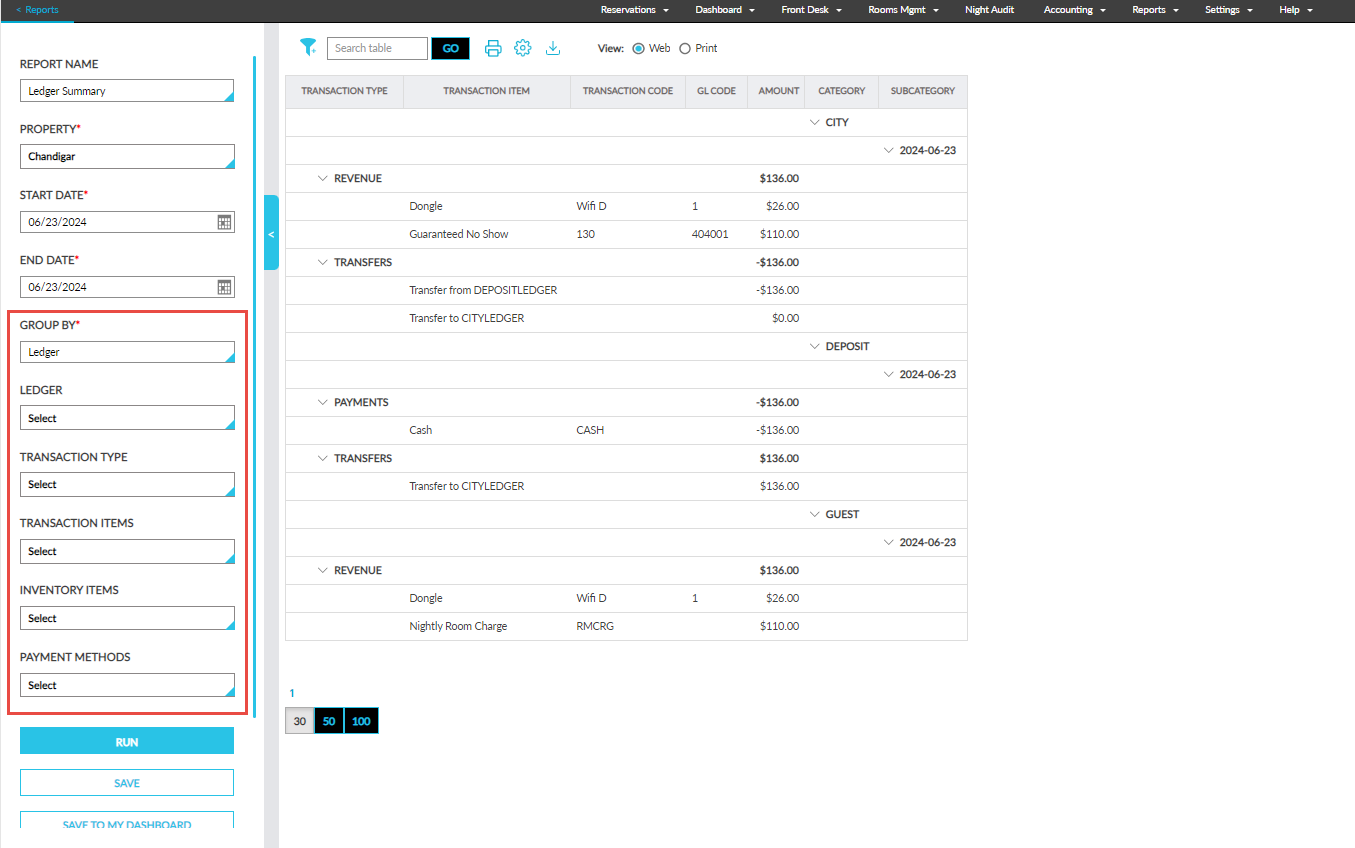
The following new report generation parameters have been added to the Ledger Summary Report (Dynamic):
|
Parameter |
Description |
|---|---|
|
Group By |
This drop-down list displays the following options:
|
|
Ledger |
This is a multi-select drop-down list that displays the following options:
|
|
Transaction Type |
This is a multi-select drop-down list that displays the following options:
By default, no option is selected. Users must select the transaction types to be included in the generated report. When no option is selected, all transaction types are included in the generated report. |
|
Transaction Items |
This is a multi-select drop-down list that displays the transaction items available at the property. By default, no option is selected. Users must select the transaction items to be included in the generated report. When no option is selected, all transaction items are included in the generated report. |
|
Inventory Items |
This is a multi-select drop-down list that displays the inventory items available at the property. By default, no option is selected. Users must select the inventory items to be included in the generated report. When no option is selected, all inventory items are included in the generated report. |
|
Payment Methods |
This is a multi-select drop-down list that displays the payment methods available at the property. By default, no option is selected. Users must select the payment methods to be included in the generated report. When no option is selected, all payment methods are included in the generated report. |